The annotation project cycle
sadda is not just an annotation editor — it is a research annotation campaign manager. This guide walks the full lifecycle a PI runs for a study, from the first exploratory notes to a monitored, agreement-checked, version-controlled corpus.
Every step is available two ways: in the desktop app under the Annotate menu,
and on the Python Project object. The running example is a small study of the
English labiodental fricatives [f] and [v].
Provisional API
The whole annotation suite is provisional — names and shapes may change before 1.0. Importing it warns once per process.
The cycle at a glance
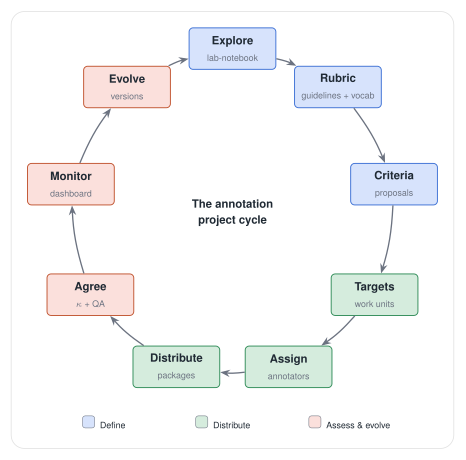
The nine stages fall into three phases — define (explore → rubric → criteria), distribute (targets → assign → distribute), and assess & evolve (agree → monitor → evolve) — and the last loops back to the first: you iterate.
Two naming conventions recur and are worth knowing up front:
"<tier> (auto)"— the preview tier a criterion writes its proposals to. You review it, then accept (promotes to the real tier) or reject."<tier> [annotator]"— a per-annotator tier produced when you import an annotator's returned package. Their work never silently overwrites yours; you reconcile per-annotator tiers explicitly with merge.
0. Project and recordings
Start from a project with at least one bundle (see the Quickstart):
import sadda
from pathlib import Path

proj = sadda.new_project(Path("fv-study"), name="labiodental-fricatives")
bundle_id = proj.add_bundle("spk01_read", Path("spk01.wav"))
In the app: File → New Project… creates the (empty) project, then File → Add Bundle… imports a WAV recording into it as a bundle.
1. Explore — the lab-notebook
Before writing any rule, explore. The lab-notebook (Annotate → Notebook…)
captures what you notice, grouped by a free-text target type (here, "f" and
"v"). Each note has a kind:
- observation — something you noticed (qualitative).
- measurement — a note tied to a value you measured (use the Measurement field for the action/result).
- decision — a methodological choice you're committing to.
e = proj.add_notebook_entry(
    "f",
    "intervocalic [f] often shows partial voicing bleeding in from vowels",
    kind="observation",
    bundle_id=bundle_id,
)
proj.add_notebook_entry(
    "f",
    "spectral centre of gravity separates f from v cleanly",
    kind="measurement",
    measurement="mean CoG: [f] ≈ 7.2 kHz, [v] ≈ 4.8 kHz over the frication",
)
When a note firms up, promote it — this is where the rubric's own creation becomes provenance ("this rule came from that observation"):
# A measurement/decision → a computational criterion (see step 3):
crit = proj.promote_entry_to_criterion(
    e, "f rule", "structured",
    '{"select": {"tier": "phones", "label_any": ["f"]}, "emit": {"kind": "span"}}',
    "frication",
)
# A decision about how to label/judge → prose rubric guidance (step 2):
proj.promote_entry_to_rubric_guidance(e)   # appends the note to the tier's guidance
In the app the notebook list offers →criterion and →guidance buttons per
note; the promoted note then shows a → criterion / → rubric_guidance marker.
Tip
The notebook is the front of the loop, not a sidebar — explore, jot, and the notes you keep returning to are exactly the ones to promote.
2. Define the rubric
The rubric (Annotate → Rubric…) is a first-class, versioned object: prose guidelines, an annotation-status vocabulary, and per-tier controlled vocabularies (allowed labels, open or closed).
proj.set_rubric("fv-scheme", 1, "Annotate frication from onset to offset of aperiodic energy.")

# Status vocabulary (value, description, sort_order):
proj.set_rubric_statuses([
    ("draft", "first pass", 0),
    ("confirmed", "checked", 1),
    ("flagged", "ambiguous vs the rubric", 2),
])

# Controlled vocabulary for the "phones" tier — closed = reject out-of-vocab labels:
proj.set_rubric_tier("phones", "labiodental fricatives only", closed=True)
proj.set_controlled_vocabulary("phones", [("f", None, 0), ("v", None, 1)])
Guidance promoted from the notebook (step 1) lands in the matching tier's description here.
3. Criteria — turn rules into proposals
A criterion (Annotate → Criteria…) is a re-runnable rule that finds regions
of interest and emits proposed annotations onto a "<tier> (auto)" preview tier.
A structured rule is JSON with select (which intervals), optional
within / overlaps relations, an optional where filter, and an
emit:
body = (
    '{"select": {"tier": "phones", "label_any": ["f", "v"]},'
    ' "where": "mean(intensity) > -30",'
    ' "emit": {"kind": "point_expr", "at": "argmax(intensity)"}}'
)
crit = proj.set_criterion("loud fricatives", "structured", body, "landmarks")
n = proj.run_criterion(crit.id, bundle_id)     # writes n proposals to "landmarks (auto)"
where and the point_expr / span_expr anchors are a small signal-function
expression language over built-in signals (f0, intensity) and any
continuous_numeric measure-track tier: reducers mean / max / min / median /
std / range / argmax / argmin / first_crossing / last_crossing, scopes
interval | file, keywords start / end / duration, and ms / % units.
Review the preview tier, then accept (promote to the real tier) or reject:
proj.accept_proposals(bundle_id, "landmarks")  # "landmarks (auto)" → "landmarks", preview cleared
# or: proj.clear_proposals(bundle_id, "landmarks")
In the app: pick a criterion in the left list (the right panel shows Name / Kind /
Target tier / Rule body), Run, then Accept proposals / Reject
proposals. Every run is traced as a criterion_run in the provenance timeline
(with the criterion's body checksum and the active rubric version).
4. Targets — the units of work
A target is the first-class unit of annotation work: a region of interest
with a lifecycle status (unassigned → assigned → in_progress → done, plus
flagged). Criteria generate targets; the assignment layer distributes them.
# One target per surviving RoI of a criterion's selection:
proj.generate_targets_from_criterion(crit.id, bundle_id)
# ...or hand-mark one:
proj.add_target(bundle_id, 0.42, 0.58, "frication")

for t in proj.targets(bundle_id):
    print(t.start_seconds, t.target_type, t.status)
In the app: Annotate → Targets… — Generate from criterion, Add manual, a live list with a per-row status combo and delete.
5. Assign
Distribute targets to annotators. Assignment is its own object (separate from the
annotation data and the rubric), with a role (primary / secondary) and a
per-annotator status.
# By hand (advances the target unassigned → assigned):
proj.add_assignment(target_id, "alice")

# ...or spread the unassigned targets across a roster, seeded & reproducible:
proj.assign_targets_randomly(bundle_id, ["alice", "bob"], seed=42)
The seed makes the split reproducible; re-running after the roster changes only touches the still-unassigned remainder. In the Targets panel: an Annotator field + per-row Assign, and an Assign randomly row (roster + seed).
6. Distribute and collect (offline, no server)
Hand each annotator a self-contained sub-project — a real sadda project with their assigned bundles, audio, the frozen rubric, and their targets. They work offline; you import the result back.
proj.export_annotator_package("alice", Path("out/alice_pkg"))   # → a sub-project dir
# alice opens out/alice_pkg in sadda, annotates, sends it back...
summary = proj.import_annotator_package(Path("out/alice_pkg"))   # lands "phones [alice]", marks done
Import never overwrites your tiers — each annotator's work lands on its own
"<tier> [annotator]" tier. Reconcile explicitly when ready:
In the Targets panel: Export for annotator… / Import package… (folder pickers) and a Merge tiers row.
7. Agreement and the work queue
Compare any two tiers over the same audio — inter-annotator (phones [alice] vs
phones [bob]), auto-vs-gold (a preview tier vs a manual one), or a tier across
rubric versions. The report carries both unit-based metrics (Cohen's κ, %
label agreement, boundary deviation, insertions/deletions) and a frame-based
κ/agreement.
r = proj.compare_tiers(bundle_id, alice_tier_id, bob_tier_id)
print(r.cohen_kappa, r.percent_label_agreement, r.mean_abs_boundary_diff)
For throughput, the work queue navigates targets by status:
proj.next_target(bundle_id, ["unassigned", "assigned"])  # next to do
proj.next_target(bundle_id, ["flagged"])                 # next flagged
In the Targets panel's QA section: a progress line, Next to do / Next flagged, and a Compare A-vs-B picker.
8. Monitor — the dashboard
Annotate → Dashboard… compiles the campaign state:
proj.project_target_progress()      # overall targets by status
proj.assignment_progress()          # per-annotator assigned / in_progress / done
proj.tier_qa(tier_id)               # out-of-vocab + missing labels + overlaps
proj.agreement_summary(bundle_id, "phones")  # pairwise κ over every "phones [annotator]" tier
Completeness comes from the assignment table; accuracy from the agreement engine; QA from the controlled vocabularies — all read-only.
9. Evolve the rubric
As you flag ambiguous tokens and refine guidance, publish a new rubric version and ask what a change affects:
proj.set_rubric("fv-scheme", 2, "...")      # bump the version, edit the scheme
proj.set_controlled_vocabulary("phones", [("f", None, 0), ("v", None, 1), ("f_voiced", None, 2)])
proj.publish_rubric_version("added f_voiced for partially-voiced [f]")

proj.rubric_versions()                       # the history
for tier in proj.rubric_impact(1):           # what changed since v1
    print(tier.tier_name, tier.vocab_added, tier.vocab_removed, tier.affected_annotations)
rubric_impact tells you, per tier, the vocabulary added/removed since a past
version and how many current annotations are now out of vocabulary — i.e. which
tokens to revisit under the updated rubric. That closes the loop back to
flagging and criteria, and the cycle repeats.
In the app: the Dashboard's Rubric versions section — publish-with-note, the version list, and Impact since version N.
Reviewing tokens together — the concordance view
Both annotating and refining get easier when you can see all the tokens of a
type at once. The concordance view (Annotate → Concordance…) concatenates
every interval matching a tier + label across the whole corpus into a single
derived bundle — your [f] tokens, in sequence, in the normal
waveform/spectrogram/tier view — with a ⟨source⟩ divider marking where each
token came from and each token's surrounding annotations remapped onto the
timeline (so you see the tokens with their context).
summary = proj.build_concordance("phones", ["f"], "f-concordance", gap_seconds=0.25)
print(summary.n_tokens, summary.duration_seconds, summary.n_context_annotations)
labels empty means any label; the matched bundles must share one sample
rate. The result is a read-only derived bundle, so it opens like any other —
use it to eyeball consistency across a label, spot outliers to flag, and seed
new notebook observations, looping back to the start of the cycle.
v1 limits
Mono only, single sample rate, and reference/dense tiers aren't carried; edits to the concordance don't flow back to the source bundles.
The loop, in one breath
Explore in the notebook → distil into the rubric and criteria → criteria generate targets → assign and distribute them → measure agreement and monitor completeness → evolve the rubric and revisit what the change affected → repeat. The criteria RoI query is the thread running through it: it is the proposal source, the target generator, and the segment list for the aggregate concordance view.